About Domivia
An AI interior designer, in your pocket
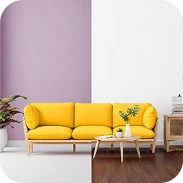
Domivia is an AI interior design app for iPhone and iPad that redesigns any room, home exterior or garden from a photo. No manual editing, ever. Tap one of 100+ styles for a whole new look, or just tell it what you want to change, and everything else stays as it was. The result looks like a real photo of your home. On the App Store it is listed as House Design AI: Domivia Home. It was called Renova AI until November 2026.
The problem Domivia solves
It is hard to picture a new look for a room you already live in. Showroom photos and mood boards show someone else's space, and paying an interior designer just to see a first idea is expensive.
Domivia starts from a photo of your own space. It is not a photo filter: generative AI models read the depth, lighting and architecture of the room, so the redesign keeps your walls, windows and layout and only changes the style.
That makes it useful before real decisions, like a kitchen remodel or the layout of a small studio, and lets you try styles side by side before you spend money on paint, flooring or furniture.
How Domivia works
- 1
Snap a photo
Take a picture of a room, garden or empty space, or pick one from your library. Furnished, cluttered and bare rooms all work.
- 2
Pick a style
Choose from 100+ design styles, such as Modern, Minimalist, Scandinavian, Japandi, Boho, Bali, Farmhouse and Art Deco.
- 3
Get the redesign
The AI detects the floor, walls, ceiling and windows, then redraws the space in that style in seconds while keeping the room's structure. No manual editing is needed.
- 4
Refine it
Type a change in plain words, like "add a fireplace" or "make the walls blue", or name an object to remove or replace it. Changes build on each other, and you can undo or redo any step. Try another style on the same photo to compare.
Key facts
- 100+ interior design styles, from Modern and Japandi to Boho, Bali and Art Deco
- Photo-like results from the best AI image-editing models available, tested for every room type and style
- Newer AI models go live without an app update, so results keep improving on their own
- We've tested the biggest apps in this space side by side: none was this easy to use or this free of manual editing, and Domivia gave the most realistic results.
- Works on furnished, cluttered or empty rooms
- Interior, exterior, garden, wall color and flooring redesigns
- Custom changes by typing what you want, with undo and redo
- Remove or replace an object by naming it; tidy up, unfurnish or rearrange a room in one tap
- Repaint walls in 100+ colors, or your own from the color picker or a hex code
- Walls and windows always stay; keep your furniture layout or see a new one
- Virtual staging for empty rooms and real estate listings
- Runs on iPhone and iPad with iOS or iPadOS 18.6 or later
- Domivia is free to download and your first 3 redesigns are free, with no watermark. After that it is a subscription: $6.99 a week, or a yearly plan for about $40 to $60 (about $5 a month or less), depending on the current offer.
- iPhone and iPad only: there is no Android or web version
- Rated 4.4 out of 5 on the App Store
- Used by 50,000+ people, with 180,000+ rooms designed
- Listed in the App Store Graphics & Design category since 4 March 2026
App Store figures as of October 2026.
Who it is for
- Homeowners planning a renovation or a redecoration
- Real estate agents, landlords and short-term rental hosts staging empty rooms
- DIYers and design students training their eye
- Anyone who wants to see a new look in their own home before paying for it
Every redesign keeps your walls and windows where they are, so what you see is your own space in a new style.
Made by Dross Creative
Domivia is built and maintained by Dross Creative, the independent studio of Zoltan Dross that builds AI-powered iOS apps.
It is published on the App Store under the developer account of Bernadett Dross-Szekely, who also works on the app, so the listing shows her name as the developer.
Questions or feedback? Get in touch through the Dross Creative contact page.